
linux centOS7 设置 redis 开机启动
匿名 · 更新于 2018/6/21
1.为了让redis-server能在系统启动时自动运行,需要将redis服务作为守护进程(daemon)来运行,我们回/usr/local/cluster/7000/目录中找到一个redis.conf的文件,这个文件是redis服务运行时加载的配置,我们先观察一下其中的内容

[root@192 7000]# vi redis.conf
输入/daemonize
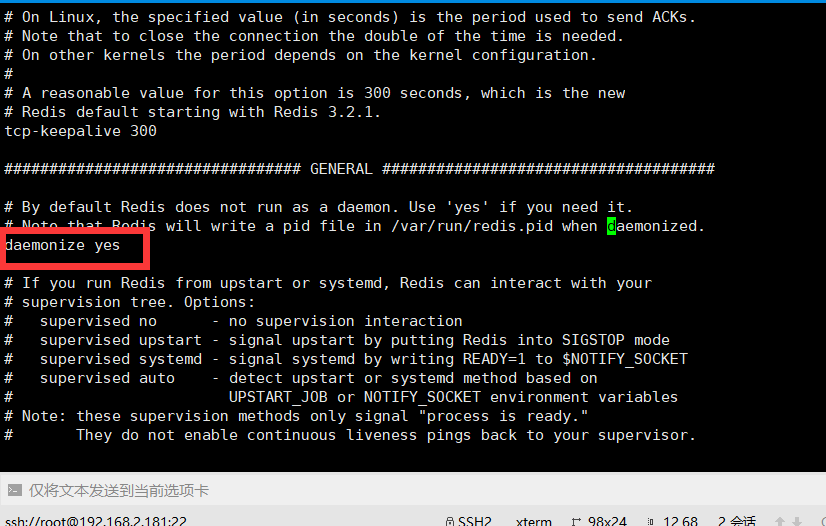
此文件内容非常长,但是大部分是注释,我们重点关注其中的几个设置daemonize和pidfile:
其中daemonize默认值是false,pidfile默认值是pidfile /var/run/redis_6379.pid
第一个表示是否daemon化,显然我们要把它改成daemonize yes;
第二个表示当服务以守护进程方式运行时,redis默认会把pid写入/var/run/redis_6379.pid文件,服务运行中该文件就存在,服务一旦停止该文件就自动删除,因而可以用来判断redis是否正在运行。
 保存后退出。
有了基本配置,redis还需要有一个管理启动、关闭、重启的一个脚本。redis源码里其实已经提供了一个初始化脚本,
位值在/usr/redis/utils/redis_init_script。
我们来看看这个脚本做了些什么:
#!/bin/sh#
REDISPORT=6379
EXEC=/usr/local/bin/redis-server
CLIEXEC=/usr/local/bin/redis-cli
PIDFILE=/var/run/redis_<span class="hljs-variable" style="margin: 0px; padding: 0px; color: green;">${REDISPORT}.pid
CONF=<span class="hljs-string" style="margin: 0px; padding: 0px; color: rgb(163, 21, 21);">"/etc/redis/<span class="hljs-variable" style="margin: 0px; padding: 0px; color: green;">${REDISPORT}.conf"
<span class="hljs-keyword" style="margin: 0px; padding: 0px; color: rgb(0, 0, 255);">case <span class="hljs-string" style="margin: 0px; padding: 0px; color: rgb(163, 21, 21);">"<span class="hljs-variable" style="margin: 0px; padding: 0px; color: green;">$1" <span class="hljs-keyword" style="margin: 0px; padding: 0px; color: rgb(0, 0, 255);">in
start)
<span class="hljs-keyword" style="margin: 0px; padding: 0px;">if [ <span class="hljs-operator" style="margin: 0px; padding: 0px;">-f <span class="hljs-variable" style="margin: 0px; padding: 0px; color: green;">$PIDFILE ]
<span class="hljs-keyword" style="margin: 0px; padding: 0px; color: rgb(0, 0, 255);">then
<span class="hljs-built_in" style="margin: 0px; padding: 0px;">echo <span class="hljs-string" style="margin: 0px; padding: 0px; color: rgb(163, 21, 21);">"<span class="hljs-variable" style="margin: 0px; padding: 0px; color: green;">$PIDFILE exists, process is already running or crashed"
<span class="hljs-keyword" style="margin: 0px; padding: 0px; color: rgb(0, 0, 255);">else
<span class="hljs-built_in" style="margin: 0px; padding: 0px;">echo <span class="hljs-string" style="margin: 0px; padding: 0px; color: rgb(163, 21, 21);">"Starting Redis server..."
<span class="hljs-variable" style="margin: 0px; padding: 0px; color: green;">$EXEC <span class="hljs-variable" style="margin: 0px; padding: 0px;">$CONF
<span class="hljs-keyword" style="margin: 0px; padding: 0px; color: rgb(0, 0, 255);">fi
;;
stop)
<span class="hljs-keyword" style="margin: 0px; padding: 0px;">if [ ! <span class="hljs-operator" style="margin: 0px; padding: 0px;">-f <span class="hljs-variable" style="margin: 0px; padding: 0px; color: green;">$PIDFILE ]
<span class="hljs-keyword" style="margin: 0px; padding: 0px; color: rgb(0, 0, 255);">then
<span class="hljs-built_in" style="margin: 0px; padding: 0px;">echo <span class="hljs-string" style="margin: 0px; padding: 0px; color: rgb(163, 21, 21);">"<span class="hljs-variable" style="margin: 0px; padding: 0px; color: green;">$PIDFILE does not exist, process is not running"
<span class="hljs-keyword" style="margin: 0px; padding: 0px; color: rgb(0, 0, 255);">else
PID=$(cat <span class="hljs-variable" style="margin: 0px; padding: 0px; color: green;">$PIDFILE)
<span class="hljs-built_in" style="margin: 0px; padding: 0px; color: rgb(0, 0, 255);">echo <span class="hljs-string" style="margin: 0px; padding: 0px; color: rgb(163, 21, 21);">"Stopping ..."
<span class="hljs-variable" style="margin: 0px; padding: 0px; color: green;">$CLIEXEC -p <span class="hljs-variable" style="margin: 0px; padding: 0px;">$REDISPORT shutdown
<span class="hljs-keyword" style="margin: 0px; padding: 0px; color: rgb(0, 0, 255);">while [ -x /proc/<span class="hljs-variable" style="margin: 0px; padding: 0px; color: green;">${PID} ]
<span class="hljs-keyword" style="margin: 0px; padding: 0px; color: rgb(0, 0, 255);">do
<span class="hljs-built_in" style="margin: 0px; padding: 0px;">echo <span class="hljs-string" style="margin: 0px; padding: 0px; color: rgb(163, 21, 21);">"Waiting for Redis to shutdown ..."
sleep <span class="hljs-number" style="margin: 0px; padding: 0px;">1
<span class="hljs-keyword" style="margin: 0px; padding: 0px; color: rgb(0, 0, 255);">done
<span class="hljs-built_in" style="margin: 0px; padding: 0px;">echo <span class="hljs-string" style="margin: 0px; padding: 0px; color: rgb(163, 21, 21);">"Redis stopped"
<span class="hljs-keyword" style="margin: 0px; padding: 0px; color: rgb(0, 0, 255);">fi
;;
*)
<span class="hljs-built_in" style="margin: 0px; padding: 0px;">echo <span class="hljs-string" style="margin: 0px; padding: 0px; color: rgb(163, 21, 21);">"Please use start or stop as first argument"
;;
<span class="hljs-keyword" style="margin: 0px; padding: 0px; color: rgb(0, 0, 255);">esac
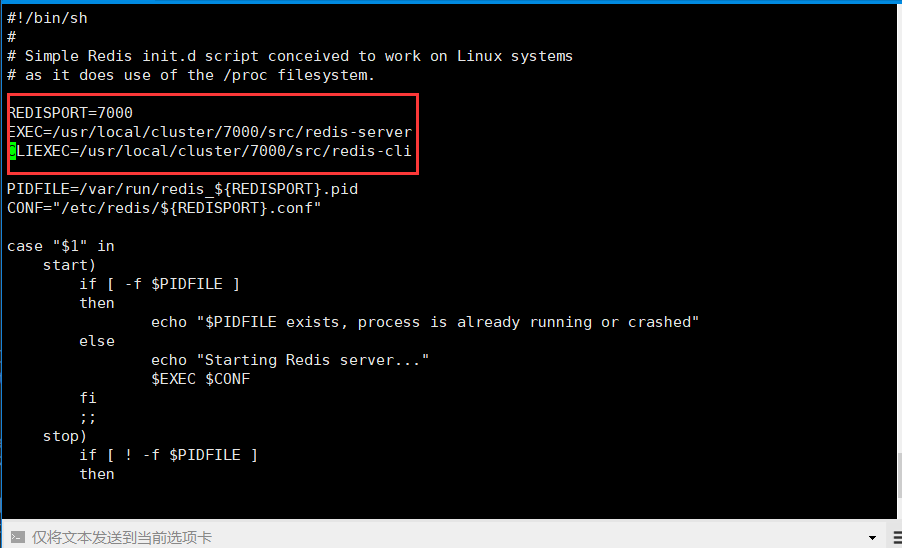
脚本中指定了端口、server路径、cli路径、pidfile路径以及conf路径,上述标黄的地方都需要正确配置,多说一句,如果在安装时执行了make install,那么这里的脚本不需要做多大改动,因为make install把server和cli都拷到/usr/local/bin下面了。
我的脚本
***
2.设置启动文件配置,进入7000的根目录
cd /usr/local/cluster/7000
mkdir /etc/redis
cp redis.conf /etc/redis/7000.conf
***
3.将启动脚本复制到/etc/init.d目录下,本例将启动脚本命名为redis (复制 /usr/local/cluster/7000/utils/redis_init_script文件)
cp redis_init_script /etc/init.d/redis
按照第一点说的修改redis文件、注意增加了chkconfig和description两行 不然会提示 服务 redisd 不支持 chkconfig ?
***
#!/bin/sh
#
# Simple Redis init.d script conceived to work on Linux systems
# as it does use of the /proc filesystem.
# chkconfig: 2345 90 10
# description: Redis is a persistent key-value database
REDISPORT=7000
EXEC=/usr/local/cluster/7000/src/redis-server
CLIEXEC=/usr/local/cluster/7000/src/redis-cli
PIDFILE=/var/run/redis_${REDISPORT}.pid
CONF="/etc/redis/${REDISPORT}.conf"
case "$1" in
start)
if [ -f $PIDFILE ]
then
echo "$PIDFILE exists, process is already running or crashed"
else
echo "Starting Redis server..."
$EXEC $CONF
fi
;;
stop)
编辑完保存就OK了
***
4.#设置为开机自启动服务器
chkconfig redis on
#打开服务
service redis start
#关闭服务
service redis stop
***
5.重启 reboot
执行ps指令,查看redis 7000端口已经启动