
vscode-使用eclipse快捷键详细说明
匿名 · 更新于 2020/3/3
因为之前已经熟悉了eclipse50多个快捷键,感觉还是比idea的快捷键用着舒服些,所以把vscode也改成eclipse风格
安装eclipse快捷键映射
修改如下快捷键
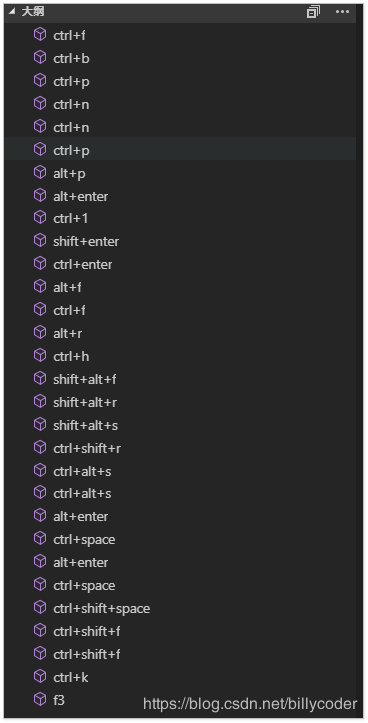
修改代码
	// 将按键绑定放在此文件中以覆盖默认值auto[]
	[
	    //自定义----begin
	    {
	        "key": "ctrl+f",
	        "command": "cursorRight",
	        "when": "textInputFocus"
	    },
	    {
	        "key": "ctrl+b",
	        "command": "cursorLeft",
	        "when": "textInputFocus"
	    },
	    {
	        "key": "ctrl+p",
	        "command": "cursorUp",
	        "when": "textInputFocus"
	    },


	    {
	        "key": "ctrl+n",
	        "command": "selectNextSuggestion",
	        "when": "suggestWidgetMultipleSuggestions && suggestWidgetVisible && textInputFocus"
	    },
	    {
	        "key": "ctrl+n",
	        "command": "cursorDown",
	        "when": "textInputFocus"
	    },
	    {
	        "key": "ctrl+p",
	        "command": "selectPrevSuggestion",
	        "when": "suggestWidgetMultipleSuggestions && suggestWidgetVisible && textInputFocus"
	    },
	    {
	        "key": "alt+p",
	        "command": "editor.action.triggerParameterHints",
	        "when": "editorHasSignatureHelpProvider && editorTextFocus"
	    },
	    {
	        "key": "alt+enter",
	        "command": "editor.action.quickFix",
	        "when": "editorTextFocus"
	    },
	    {
	        "key": "ctrl+1",
	        "command": "-editor.action.quickFix",
	        "when": "editorTextFocus"
	    },
	    {
	        "key": "shift+enter",
	        "command": "editor.action.insertLineAfter",
	        "when": "editorTextFocus && !editorReadonly"
	    },
	    {
	        "key": "ctrl+enter",
	        "command": "-editor.action.insertLineAfter",
	        "when": "editorTextFocus && !editorReadonly"
	    },
	    {
	        "key": "alt+f",
	        "command": "actions.find"
	    },
	    {
	        "key": "ctrl+f",
	        "command": "-actions.find"
	    },
	    {
	        "key": "alt+r",
	        "command": "editor.action.startFindReplaceAction"
	    },
	    {
	        "key": "ctrl+h",
	        "command": "-editor.action.startFindReplaceAction"
	    },
	    {
	        "key": "shift+alt+f",
	        "command": "-editor.action.formatDocument",
	        "when": "editorTextFocus && !editorReadonly"
	    },
	    {
	        "key": "shift+alt+r",
	        "command": "-revealFileInOS",
	        "when": "!editorFocus"
	    },
	    {
	        "key": "shift+alt+s",
	        "command": "editor.action.refactor",
	        "when": "editorHasCodeActionsProvider && editorTextFocus && !editorReadonly"
	    },
	    {
	        "key": "ctrl+shift+r",
	        "command": "-editor.action.refactor",
	        "when": "editorHasCodeActionsProvider && editorTextFocus && !editorReadonly"
	    },
	    {
	        "key": "ctrl+alt+s",
	        "command": "-workbench.action.files.saveAs"
	    },
	    {
	        "key": "ctrl+alt+s",
	        "command": "workbench.action.openGlobalSettings"
	    },
	    {
	        "key": "alt+enter",
	        "command": "editor.action.triggerSuggest",
	        "when": "editorTextFocus"
	    },
	    {
	        "key": "ctrl+space",
	        "command": "-editor.action.triggerSuggest",
	        "when": "editorTextFocus"
	    },
	    {
	        "key": "alt+enter",
	        "command": "editor.action.triggerSuggest",
	        "when": "editorHasCompletionItemProvider && textInputFocus && !editorReadonly"
	    },
	    {
	        "key": "ctrl+space",
	        "command": "-editor.action.triggerSuggest",
	        "when": "editorHasCompletionItemProvider && textInputFocus && !editorReadonly"
	    },
	    {
	        "key": "ctrl+shift+space",
	        "command": "-editor.action.triggerParameterHints",
	        "when": "editorHasSignatureHelpProvider && editorTextFocus"
	    },
	    {
	        "key": "ctrl+shift+f",
	        "command": "-workbench.action.findInFiles"
	    },
	    {
	        "key": "ctrl+shift+f",
	        "command": "-workbench.view.search",
	        "when": "!searchViewletVisible"
	    },
	    {
	        "key": "ctrl+k",
	        "command": "editor.action.nextMatchFindAction",
	        "when": "editorFocus"
	    },
	    {
	        "key": "f3",
	        "command": "-editor.action.nextMatchFindAction",
	        "when": "editorFocus"
	    },

	    //自定义----end
	 ]
vscode不具有的功能
用过idea写js,vscode有些功能是不具有的,可以知道下
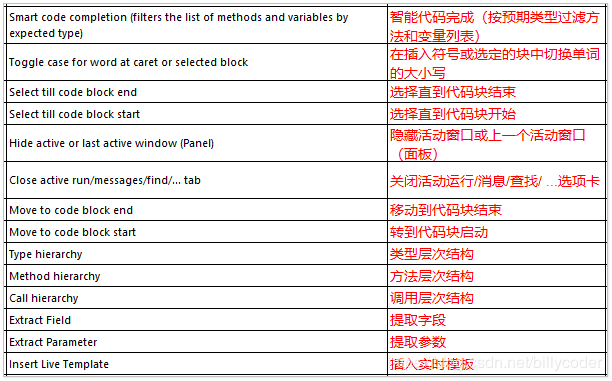
vscode快捷键 eclipse版本
| 类型 | 快捷键 | 修改 | 英文描述 | 中文描述 |
|---|---|---|---|---|
| 编辑 | ctrl+1 | alt+enter | Other->Show Intention Actions | 提示可能的操作 |
| 编辑 | alt+上下箭头 | Code->Move Line Up/Down | 移动一行代码 | |
| 编辑 | ctrl+alt+上下箭头 | Editor Actions->Duplicate Lines | 复制一行 | |
| 编辑 | ctrl+d | Editor Actions->Delete Lines | 删除一行 | |
| 编辑 | ctrl+p | alt+P | View->Parameter Info | 参数信息 |
| 编辑 | shift+enter | Start New Line | 向下开启新的一行 | |
| 编辑 | ctrl+shift+enter | Start New Line Before Current | 向下开启新的一行 | |
| 编辑 | alt+/ | Code->Completion->Basic | 提示变量 | |
| 编辑 | Code->Generate | 生成getter,setter,tostring等 | ||
| 编辑 | 无 | Code->Surround With | 生成常见的代码块,try catch等 | |
| 编辑 | 无 | Refactor->Extract->Variable | 抽取变量 | |
| 编辑 | 无 | Complete Current Statement | 自动补全 | |
| 编辑 | ctrl+shift+f | Reformat Code | 格式化 | |
| 编辑 | ctrl+y | redo | 反撤销 | |
| 查看 | 无 | View->Quick Docmentation | 查看文档 | |
| 查看 | ctrl+shift+r | 无 | Navigate->File | 查看找工作空间的文件 |
| 查看 | ctrl+shift+t | 无 | Navigate->Class | 查看类定义 |
| 查看 | ctrl+shift+g | Edit->Find->Find Usages | 查看方法在哪里调用.变量在哪里被使用 | |
| 查看 | ctrl+shift+g | Edit->Find->Find Usages | 查看方法在哪里调用.变量在哪里被使用 | |
| 查看 | ctrl+t | Other->Hierarchy Class | 查看类继承结构,看接口的实现,看抽象方法的实现 | |
| 查看 | ctrl+o | 通过outline视图 | Navigate->File Structure | 查看一个类里面的方法 |
| 查看 | Collapse、Expand | 代码折叠/展开 局部 | ||
| 查看 | Ctrl+shift+减号; Ctrl+shift+加号 | Collapse All、Expand All | 代码折叠/展开 所有 | |
| 查看 | shift+alt±><- | Move Caret to Code Block Start with Selection | 选中一个范围类代码 | |
| 查看 | ctrl+e | View->Recent Files | 查看最近打开的文件 | |
| 窗口 | ctrl+w | Window->Editor Tabs->Close | 关闭当前窗口 | |
| 窗口 | esc | Hide Active Tools Window | 隐藏窗口 | |
| 窗口 | ctrl+m | Tool Windows-> Project | 最大化窗口 | |
| 窗口 | ctrl+shift+w | Window->Editor Tabs->Close All | 关闭所有窗口 | |
| 关标 | alt+left | Navigate->Back | 回退上一个操作位置 | |
| 关标 | alt+right | Navigate->Forward | 前进上一个操作位置 | |
| 关标 | ctrl+home | Move Caret to Text Start | 回到类最前面 | |
| 关标 | ctrl+end | Move Caret to Text End | 回到类最后面 | |
| 关标 | ctrl+f | Editor Actions->Right | 后移 | |
| 关标 | ctrl+b | Editor Actions->Left | 前移 | |
| 关标 | ctrl+p | Editor Actions->Up | 上移 | |
| 关标 | ctrl+n | Editor Actions->Down | 下移 | |
| 关标 | ctrl+l | Navigate->Line/Colmn | 指定行 | |
| 关标 | ctrl+k | Find->Find Next / Move to Next Occurrence | 下一个搜索结果 | |
| 模板 | ctrl+shift+s | Tools->save as live template | 保存代码到模板 | |
| 搜索替换 | ctrl+shift+h | Replace in Path | 替换当前文件 | |
| 搜索替换 | ctrl+h | Replace in Path | 搜索全局 | |
| 搜索替换 | ctrl+f | alt+f | Find | 搜索当前文件 |
| 搜索替换 | alt+r | Replace | 替换当前文件 | |
| 调试 | f5 | Run->Step Into | 进入 | |
| 调试 | f6 | Run->Step Over | 下一步 | |
| 调试 | f8 | Run->Resume Program | 下一个断点 | |
| 运行 | ctrl+f11 | Run->Run | 运行 | |
| 重构 | shift+alt+s | Refactor->Extract->Method | 抽取方法 | |
| 重构 | Refactor->Extract->Field | 局部变量转换成成员变量 | ||
| 重构 | shift+ctrl+x; shift+ctrl+y; | Editor Actions->Toggle Case | 转换大小写 | |
| 重构 | Refactor->rename | 重命名 | ||
| 注释 | doc | Other->Fix doc comment | 类注释 | |
| 注释 | ctrl+alt+j | Other->Fix doc comment | 方法注释 | |
| 注释 | ctrl+/ | Comment with Line Comment | 单行 | |
| 注释 | shift+ctrl+/ | Comment with Block Comment | 多行 | |
| 新建 | alt+n | File->New | 新建 |