
vue-cli作用
vue-cli作为vue的脚手架,可以帮助我们在实际开发中自动生成vue.js的模板工程。
vue-cli使用
!!前提:需要vue和webpack
-
安装全局vue-cli
<pre class="hljs avrasm" style="box-sizing: border-box; overflow: auto; font-family: "Source Code Pro", Consolas, Menlo, Monaco, "Courier New", monospace; font-size: 0.93em; padding: 1em; margin-bottom: 1.5em; line-height: 1.45; word-break: break-all; background: url("../img/blueprint.png") 0% 0% / 30px, 0% 0% / 30px rgb(246, 246, 246); border: none; border-radius: 4px; max-height: 35em; position: relative; margin-top: 0px !important;">npm install vue-cli -g -
初始化,生成项目模板(my_project是项目名,自己随意)
<pre class="hljs nginx" style="box-sizing: border-box; overflow: auto; font-family: "Source Code Pro", Consolas, Menlo, Monaco, "Courier New", monospace; font-size: 0.93em; padding: 1em; margin-bottom: 1.5em; line-height: 1.45; word-break: break-all; background: url("../img/blueprint.png") 0% 0% / 30px, 0% 0% / 30px rgb(246, 246, 246); border: none; border-radius: 4px; max-height: 35em; position: relative; margin-top: 0px !important;">vue init webpack my_project -
进入生成的项目文件夹
<pre class="hljs bash" style="box-sizing: border-box; overflow: auto; font-family: "Source Code Pro", Consolas, Menlo, Monaco, "Courier New", monospace; font-size: 0.93em; padding: 1em; margin-bottom: 1.5em; line-height: 1.45; word-break: break-all; background: url("../img/blueprint.png") 0% 0% / 30px, 0% 0% / 30px rgb(246, 246, 246); border: none; border-radius: 4px; max-height: 35em; position: relative; margin-top: 0px !important;">cd my_project -
初始化,安装依赖
<pre class="hljs cmake" style="box-sizing: border-box; overflow: auto; font-family: "Source Code Pro", Consolas, Menlo, Monaco, "Courier New", monospace; font-size: 0.93em; padding: 1em; margin-bottom: 1.5em; line-height: 1.45; word-break: break-all; background: url("../img/blueprint.png") 0% 0% / 30px, 0% 0% / 30px rgb(246, 246, 246); border: none; border-radius: 4px; max-height: 35em; position: relative; margin-top: 0px !important;">npm install
安装完成,目录树:
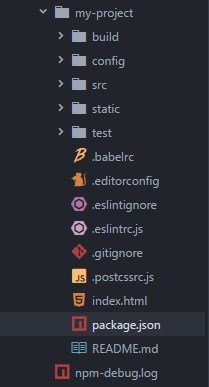
run:
npm run dev
浏览器会自动打开到http://localhost:8080/#/ ,会看到欢迎页:

上面是在本地运行,服务器上运行:
npm run build
生成静态文件:
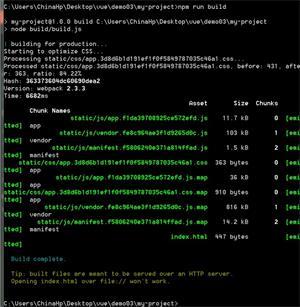
打开dist文件夹下新生成的index.html文件,会发现页面空白,打开控制台会发现页面中引用的css和js文件都找不到:

说明引用路径错了,需要手动修改:
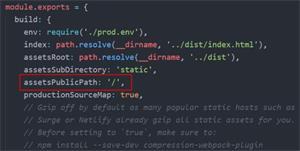
进入config/index.js
原配置中的引用路径是’/’(根目录):
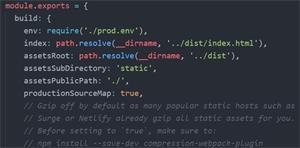
修改为’./’(当前目录):
run:
npm run build
Done: