No.4 自定义CKEditor工具栏
匿名 · 更新于 2015/1/14
经过前3节的学习,我们已经掌握了CKEditor在线编辑器的基本使用方法,也许有很多朋友已经发现,我们的CKEditor有很多工具,但是大部分是很少用到或基
本用不到的,今天我们就DIY一个属于自己的,简洁实用的CKEditor工具栏!
编辑ckeditor目录下的的config.js文件,默认的是下面的工具栏代码(特别说明:config.js中没有下面的代码,默认就是显示全部按钮,但如果对工具栏进行自定
义,最好的办法还是把该代码全部复制粘贴,然后再删除一个个不需要的按钮)
config.toolbar = [
        { name: 'document', items : [ 'Source','-','Save','NewPage','DocProps','Preview','Print','-','Templates' ] },
        { name: 'clipboard', items : [ 'Cut','Copy','Paste','PasteText','PasteFromWord','-','Undo','Redo' ] },
        { name: 'editing', items : [ 'Find','Replace','-','SelectAll','-','SpellChecker', 'Scayt' ] },
        { name: 'forms', items : [ 'Form', 'Checkbox', 'Radio', 'TextField', 'Textarea', 'Select', 'Button', 'ImageButton',
        'HiddenField' ] },
        '/',
        { name: 'basicstyles', items : [ 'Bold','Italic','Underline','Strike','Subscript','Superscript','-','RemoveFormat' ] },
        { name: 'paragraph', items : [ 'NumberedList','BulletedList','-','Outdent','Indent','-','Blockquote','CreateDiv',
        '-','JustifyLeft','JustifyCenter','JustifyRight','JustifyBlock','-','BidiLtr','BidiRtl' ] },
        { name: 'links', items : [ 'Link','Unlink','Anchor' ] },
        { name: 'insert', items : [ 'Image','Flash','Table','HorizontalRule','Smiley','SpecialChar','PageBreak','Iframe' ] },
        '/',
        { name: 'styles', items : [ 'Styles','Format','Font','FontSize' ] },
        { name: 'colors', items : [ 'TextColor','BGColor' ] },
        { name: 'tools', items : [ 'Maximize', 'ShowBlocks','-','About' ]},
];
注意工具按钮是分组的,一个name内的大括号就是一个工具按钮分组,items后边是具体的按钮,我们可以对这些内容进行适当的删除。比如将config.js做
成如下的内容:
config.toolbar = [
        { name: 'document', items : [ 'Source' ] },
        { name: 'clipboard', items : [ 'Cut','Copy','Paste','PasteText','PasteFromWord','-','Undo','Redo' ] },
        { name: 'basicstyles', items : [ 'Bold','Italic','Underline','Strike','-','RemoveFormat' ] },
        { name: 'paragraph', items : [ 'JustifyLeft','JustifyCenter','JustifyRight','JustifyBlock' ] },
		'/',
        { name: 'links', items : [ 'Link','Unlink','Anchor' ] },
        { name: 'insert', items : [ 'Image','Flash','Table','HorizontalRule','Smiley' ] },
        { name: 'styles', items : [ 'Font','FontSize' ] },
        { name: 'colors', items : [ 'TextColor','BGColor' ] }
];
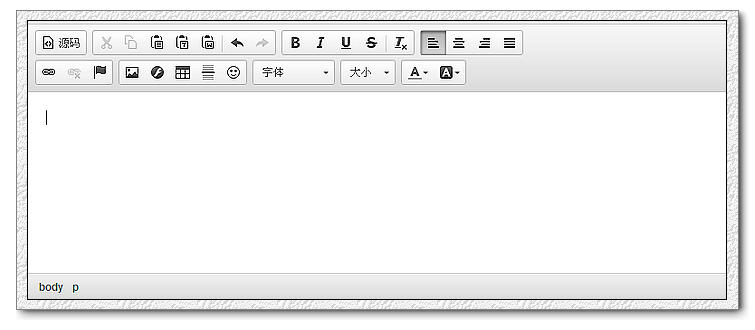
上代码创建的CKEditor工具栏就如下图所示: