
Repository 使用说明
匿名 · 更新于 2019/8/23
简介
更多关于 Repository 的使用说明,请戳这里Repository文档地址
laravel-repository 提供了基础的 repository 类, 对laravel 的 model 进行了的封装,提供更多的对外的方法,以及更友好的编辑器提示;对代码进行了的分层,repository 负责对外的业务逻辑处理,model 只负责对数据表的字段、属性、查询条件、返回值的定义,不参与具体的逻辑运算,不对控制层服务.
相对于直接使用model优势:
- 用操作
数组的方式操作数据库模型. (php中还有什么比数组用起来更爽的数据结构呢?) - 解决
model在新增、修改时不自动处理多余字段问题 - 优化
model查询时的链式调用,直接使用数组的方式进行查询 - 通过查询条件和查询字段,自动处理对应的关联数据查询
- 提供了更友好的编辑器提示
安装使用
安装要求
- PHP >= 7.0.0
- Laravel >= 5.5.0
1.1 安装
composer require littlebug/laravel-repository
1.2 使用命令生成 model 和 repository
假设你的数据库中有一张表 users, 或者你将 users 替换为你数据库中的表名称
php artisan core:model --table=users --name=User
该命令会在:
app/Models/文件下生成User文件app/Repositories/文件下生成UserRepository文件
1.3 在控制器中使用 repository
use App\Repositories\UserRepository;

class UsersController extends Controller
{
    /**
    * @var UserRepository
    */
    private $userRepository;

    public function __construct(UserRepository $userRepository)
    {
         $this->userRepository   = $userRepository;
    }

    public function index()
    {
         // 分页查询
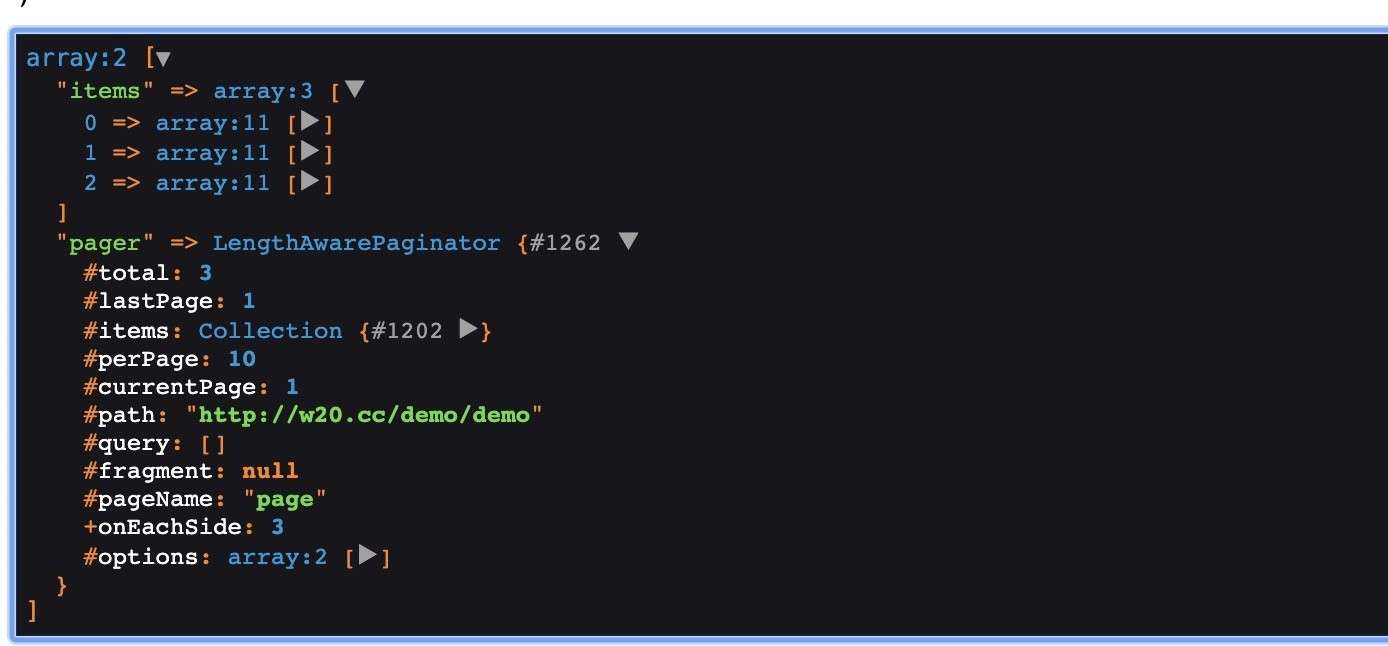
         $list = $this->userRepository->paginate([ 'name:like' => 'test123', 'status:in' => [1, 2]]);
         return view('users.index');
    }

    public function create()
    {
         list($ok, $msg, $user) = $this->userRepository->create(request()->all());
         // 你的逻辑
    }

    public function update()
    {
         list($ok, $msg, $row) = $this->userRepository->update(request()->input('id'), request()->all());
         // 你的逻辑
    }

    public function delete()
    {
         list($ok, $msg, $row) = $this->userRepository->delete(request()->input('id'));
         // 你的逻辑
    }
}
1.3.1 关于分页查询数据
更多的代码生成命令
命令都支持指定数据库连接 例如 --table=dev.users
core:model通过查询数据库表信息生成model类文件 和repository类文件
php artisan core:model --table=users --name=User
core:repository生成repository类文件
php artisan core:repository --model=User --name=UserRepository
core:request通过查询数据库表信息生成request验证类文件
php artisan core:request --table=users --path=Users
命令参数详情

感谢 jinxing.liu 贡献的代码
欢迎提交使用中遇到的问题, 我们会及时去优化处理
如果这个仓库帮助到了你,给我一个star来鼓励我~ ✨,我会坚持继续维护这个仓库
Repository 使用说明
Repository 是对 laravel model 的一个补充,优化了laravel model 的 CURD 操作, 并提供更多的方法,以及更友好的编辑器提示
一 增删改查
1.1 新增数据 create(array $data)
/**
 * 返回值说明
 * @param boolean $ok   true 表示成功
 * @param string  $msg  操作的提示信息
 * @param array   $data 新增成功后调用 model->toArray() 返回的数据, 失败为null
 */
list($ok, $msg, $data) = $this->repository->create([
    'user_name' => 'Tony',
    'age'       => 18,
    'sex'       => 1,
    'address    => 'America'
]);
1.2 编辑数据 update($conditions, array $data)
/**
 * 返回值说明
 * @param boolean $ok   true 表示成功
 * @param string  $msg  操作的提示信息
 * @param int     $rows 表示修改数据条数
 */
list($ok, $msg, $rows) = $this->repository->update(1, ['type' => 3, 'money' => 9999]); // 主键修改 pk = 1
// $this->repository->update(['id:gt' => 10], ['type' => 3, 'money' => 9999]);  // 条件修改 id > 10
// $this->repository->update([1, 2, 3, 4], ['type' => 3, 'money' => 9999]); // 主键修改 pk in (1, 2, 3, 4)
1.3 删除数据 delete($conditions)
/**
 * 返回值说明
 * @param boolean $ok   true 表示成功
 * @param string  $msg  操作的提示信息
 * @param int     $rows 表示删除数据条数
 */
list($ok, $msg, $rows) = $this->repository->delete(1); // 主键删除 pk = 1
// $this->repository->delete(['id:gt' => 10]);  // 条件删除 id > 10
// $this->>repository->delete([1, 2, 3, 4, 5]); // 主键删除 pk in (1, 2, 3, 4)
1.4 查询数据
1.4.1 查询单条数据
-
查询单条数据 find($conditions, $columns = [])
<div class="highlight highlight-text-html-php" style="box-sizing: border-box; margin-bottom: 16px;"> <pre style="box-sizing: border-box; font-family: SFMono-Regular, Consolas, "Liberation Mono", Menlo, Courier, monospace; font-size: 13.6px; margin-bottom: 0px; margin-top: 0px; overflow-wrap: normal; background-color: rgb(246, 248, 250); border-radius: 3px; line-height: 1.45; overflow: auto; padding: 16px; word-break: normal;">$item = $this->repository->find(1); // 主键查询 pk = 1
-
查询单个字段 findBy($conditions, $column)
<div class="highlight highlight-text-html-php" style="box-sizing: border-box; margin-bottom: 16px;"> <pre style="box-sizing: border-box; font-family: SFMono-Regular, Consolas, "Liberation Mono", Menlo, Courier, monospace; font-size: 13.6px; margin-bottom: 0px; margin-top: 0px; overflow-wrap: normal; background-color: rgb(246, 248, 250); border-radius: 3px; line-height: 1.45; overflow: auto; padding: 16px; word-break: normal;">$name = $this->repository->findBy(1, 'name'); // 查某个字段
1.4.2 查询多条数据
-
查询多条数据 findAll($conditions, $columns = [])
<div class="highlight highlight-text-html-php" style="box-sizing: border-box; margin-bottom: 16px;"> <pre style="box-sizing: border-box; font-family: SFMono-Regular, Consolas, "Liberation Mono", Menlo, Courier, monospace; font-size: 13.6px; margin-bottom: 0px; margin-top: 0px; overflow-wrap: normal; background-color: rgb(246, 248, 250); border-radius: 3px; line-height: 1.45; overflow: auto; padding: 16px; word-break: normal;">$items = $this->repository->findAll([1, 2, 3, 4]); // 主键查询 pk in (1, 2, 3, 4)
-
查询多条数据的单个字段 findAllBy($conditions, $column)
<div class="highlight highlight-text-html-php" style="box-sizing: border-box; margin-bottom: 16px;"> <pre style="box-sizing: border-box; font-family: SFMono-Regular, Consolas, "Liberation Mono", Menlo, Courier, monospace; font-size: 13.6px; margin-bottom: 0px; margin-top: 0px; overflow-wrap: normal; background-color: rgb(246, 248, 250); border-radius: 3px; line-height: 1.45; overflow: auto; padding: 16px; word-break: normal;">$usernames = $this->repository->findAllBy([1, 2, 3], 'username'); // 查询某个字段的所有值
1.4.3 分页查询
分页查询 paginate($conditions = [], $columns = [], $size = 10, $current = null)
$list = $this->repository->paginate(['status' => 1], ['id', 'name', ...]);
1.4.4 使用findWhere(array $where, array $columns = [])构建复杂的查询
    $users = $this->userRepository->findWhere([
        'and',
        ['or', ['username:auto_like' => 'test'], ['nick_name', 'like', '%test%']],
        ['level' => 5],
        ['status', '=', 1],
    ])->get();
上面查询生成的SQl
select * from `users` where (
    (`users`.`username` like '%test%' or `users`.`nick_name` like '%test%')
    and `users`.`level` = 5
    and `users`.`status` = 1
)
1.4.4.1 使用说明
-
只能使用数组查询
-
数组的第一个元素,确定数组中其他查询条件的连接方式
and或or;and可以忽悠不写<div class="highlight highlight-text-html-php" style="box-sizing: border-box; margin-bottom: 16px;"> <pre style="box-sizing: border-box; font-family: SFMono-Regular, Consolas, "Liberation Mono", Menlo, Courier, monospace; font-size: 13.6px; margin-bottom: 0px; margin-top: 0px; overflow-wrap: normal; background-color: rgb(246, 248, 250); border-radius: 3px; line-height: 1.45; overflow: auto; padding: 16px; word-break: normal;">$where = [ // 第一个元素,如果是 and 查询,可以不用写 ['level' => 5], ['status' => 1], [ // or 表示 数组中,下面查询条件使用 or 连接 'or', ['username' => 'test'], ['name' => 'test123'] ], ];
-
数组中的查询条件,必须使用数组方式
<ul style="box-sizing: border-box; margin-bottom: 0px; margin-top: 0px; padding-left: 2em;"> <li style="box-sizing: border-box;"><code style="box-sizing: border-box; font-family: SFMono-Regular, Consolas, "Liberation Mono", Menlo, Courier, monospace; font-size: 13.6px; background-color: rgba(27, 31, 35, 0.05); border-radius: 3px; margin: 0px; padding: 0.2em 0.4em;">['字段', '表达式', '查询值']</code></li> <li style="box-sizing: border-box; margin-top: 0.25em;"><code style="box-sizing: border-box; font-family: SFMono-Regular, Consolas, "Liberation Mono", Menlo, Courier, monospace; font-size: 13.6px; background-color: rgba(27, 31, 35, 0.05); border-radius: 3px; margin: 0px; padding: 0.2em 0.4em;">['字段:表达式' => '查询值']</code></li> <li style="box-sizing: border-box; margin-top: 0.25em;"><code style="box-sizing: border-box; font-family: SFMono-Regular, Consolas, "Liberation Mono", Menlo, Courier, monospace; font-size: 13.6px; background-color: rgba(27, 31, 35, 0.05); border-radius: 3px; margin: 0px; padding: 0.2em 0.4em;">['字段' => '查询值']</code></li> </ul> <blockquote style="box-sizing: border-box; margin: 0px 0px 16px; border-left-width: 0.25em; border-left-color: rgb(223, 226, 229); color: rgb(106, 115, 125); padding: 0px 1em;"> <p style="box-sizing: border-box; margin-bottom: 0px; margin-top: 0px;">建议使用<code style="box-sizing: border-box; font-family: SFMono-Regular, Consolas, "Liberation Mono", Menlo, Courier, monospace; font-size: 13.6px; background-color: rgba(27, 31, 35, 0.05); border-radius: 3px; margin: 0px; padding: 0.2em 0.4em;">['字段', '表达式', '查询值']</code> 比较直观</p> </blockquote> </li>
1.5 查询进阶使用
1.5.1 使用表达式查询
使用方式
字段:表达式 => 对应查询的值
例如:
$items = $this->repository->findAll([
    'id:neq'    => 1,
    'name:like' => '%test%'
]);
// 对应生成的sql: id != 1 and name like '%test%'
1.5.1.1 目前支持的表达式
| 表达式 | 含义 | 特别说明 |
|---|---|---|
| eq | 等于(=) | |
| neq | 不等于(!=) | |
| ne | 不等于(!=) | |
| gt | 大于(>) | |
| egt | 大于等于(>=) | |
| gte | 大于等于(>=) | |
| ge | 大于等于(>=) | |
| lt | 小于(<) | |
| le | 小于等于(<=) | |
| lte | 小于等于(<=) | |
| elt | 小于等于(<=) | |
| in | IN 查询 | 传入数据会强转为数组 |
| not in | NOT IN 查询 | 传入数据会强转为数组 |
| not_in | NOT IN 查询 | 传入数据会强转为数组 |
| between | 区间查询(between) | 传入数据会强转为数组 |
| not_between | 不在区间查询(not between) | 传入数据会强转为数组 |
| not between | 不在区间查询(not between) | 传入数据会强转为数组 |
| like | 模糊查询包含(like) | 传入数据会强转为字符串 |
| not_like | 模糊查询不包含(not like) | 传入数据会强转为字符串 |
| not like | 模糊查询不包含(not like) | 传入数据会强转为字符串 |
| rlike | 模糊查询包含(rlike) | |
| <> | 不等于(<>) | |
| auto_like | 模糊查询(like) | 会自动判断添加 % 模糊查询 |
1.5.1.2 关于 auto_like 查询说明
// 没有添加前后模糊查询,会自动加上 username like '%test%'
$this->repository->findAll(['username:auto_like' => 'test']);
// 添加了前缀或者后缀模糊查询,那么不处理 username like 'test%'
$this->repository->findAll(['username:auto_like' => 'test%']);
1.5.1.3 你可以像下面这样使用表达式:
// 查询大于10的账号
$this->repository->findAll(['id:gt' => 10]);
// 查询不等于10的账号
$this->repository->findAll(['id:neq' => 10]);
// 查询id是1,2,3,4,5的这些数据
$this->repository->findAll(['id:in' => [1, 2, 3, 4, 5]);
// or
$this->repository->findAll(['id' => [1, 2, 3, 4, 5]])
// 查询创建时间在2019年的数据
$this->repository->findAll(['created_at:between' =>
    [
        '2019-01-01 00:00:00',
        '2020-01-01 00:00:00',
    ]
]);
1.5.1.4 如果你记不住表达式,那么你同样可以直接使用操作符查询也是一样的
$item = $this->repository->findAll([
    'id:!='         => 2,
    'username:like' => '%test%',
    'status:>='     => 4,
])
同样是 查询字段:操作符 => '查询的值'
1.5.1.5 其他说明
update 和 create 方法同样支持表达式查询,都是使用findCondition($condiitons) 方法处理
1.5.2 使用 model 的 scope 查询
举个?栗子,你有一张用户表 users, 用户表的扩展信息存在 user_ext 里; 现在你想查询用户地址在指定位置信息的所有用户信息, 那么就需要使用
scope查询了
要求model定义了scope查询
-
model
<div class="highlight highlight-text-html-php" style="box-sizing: border-box; margin-bottom: 16px;"> <pre style="box-sizing: border-box; font-family: SFMono-Regular, Consolas, "Liberation Mono", Menlo, Courier, monospace; font-size: 13.6px; margin-bottom: 0px; margin-top: 0px; overflow-wrap: normal; background-color: rgb(246, 248, 250); border-radius: 3px; line-height: 1.45; overflow: auto; padding: 16px; word-break: normal;">class User extends Model { protected $table = 'users'; protected $primaryKey = 'user_id'; public $columns = [ 'user_id', 'username', //... 'created_at', 'updated_at', ]; /** * 定义关联扩展信息 * * return Illuminate\Database\Eloquent\Relations\HasOne */ public function extInfo() { return $this->hasOne(UserExt::class, 'user_id', 'user_id'); }
/** * 根据地址查询 * @param \Illuminate\Database\Eloquent\Builder $query 查询对象 * @param string $address 地址信息 * @return \Illuminate\Database\Eloquent\Builder / public function scopeAddress($query, $address) { return $query->leftJoin('user_ext', 'user_ext.user_id', '=', 'users.user_id') ->where('user_ext.address', '=', $address); } }
-
使用
repository查询<div class="highlight highlight-text-html-php" style="box-sizing: border-box; margin-bottom: 16px;"> <pre style="box-sizing: border-box; font-family: SFMono-Regular, Consolas, "Liberation Mono", Menlo, Courier, monospace; font-size: 13.6px; margin-bottom: 0px; margin-top: 0px; overflow-wrap: normal; background-color: rgb(246, 248, 250); border-radius: 3px; line-height: 1.45; overflow: auto; padding: 16px; word-break: normal;">$this->userRepositoy->findAll([ 'status' => 1, 'address' => '北京' ]);
-
查询的SQL
<div class="highlight highlight-source-sql" style="box-sizing: border-box; margin-bottom: 16px;"> <pre style="box-sizing: border-box; font-family: SFMono-Regular, Consolas, "Liberation Mono", Menlo, Courier, monospace; font-size: 13.6px; margin-bottom: 0px; margin-top: 0px; overflow-wrap: normal; background-color: rgb(246, 248, 250); border-radius: 3px; line-height: 1.45; overflow: auto; padding: 16px; word-break: normal;">select * from
</span>users<span class="pl-pds" style="box-sizing: border-box;">left join</span>user_ext<span class="pl-pds" style="box-sizing: border-box;">on (</span>user_ext<span class="pl-pds" style="box-sizing: border-box;">.</span>user_id<span class="pl-pds" style="box-sizing: border-box;">=</span>users<span class="pl-pds" style="box-sizing: border-box;">.</span>user_id<span class="pl-pds" style="box-sizing: border-box;">) where</span>users.status<span class="pl-pds" style="box-sizing: border-box;">= 1 and</span>user_ext<span class="pl-pds" style="box-sizing: border-box;">.</span>address<span class="pl-pds" style="box-sizing: border-box;">= '北京'
1.5.2.1 使用说明
从上面的SQL和容易发现一个问题,没有指定查询字段,默认查询的 * 所有字段,如果users表和user_ext 表的字段没有冲突,那么没有什么问题,但如果有冲突,那么查询出来的数据可能和你想象的不一样,特别在还有 关联查询的时候,这个问题更容易凸显出来,所以建议在有连表查询的时候,最好有加上你需要查询的字段信息
$this->userRepository->findAll([
    'status'  => 1,
    'address' => '北京',
], ['users.*'])
1.5.4 获取 model 的 relation 关联数据信息
当我们查询数据时候,也想把关联数据查询出来的时候,就会用到关联查询
使用的是model的with方法
举个?栗子,你有一张用户表users,用户表的扩展信息存在user_ext里 也许你想查询用户信息的时候同时查出用户的扩展信息
要求model定义了关联
model 使用上面定义的 User
-
使用
repository获取关联数据信息, 通过查询字段,自动处理关联<p style="box-sizing: border-box; margin-bottom: 16px; margin-top: 16px;">查询字段中添加 <code style="box-sizing: border-box; font-family: SFMono-Regular, Consolas, "Liberation Mono", Menlo, Courier, monospace; font-size: 13.6px; background-color: rgba(27, 31, 35, 0.05); border-radius: 3px; margin: 0px; padding: 0.2em 0.4em;">关联关系</code> => [<code style="box-sizing: border-box; font-family: SFMono-Regular, Consolas, "Liberation Mono", Menlo, Courier, monospace; font-size: 13.6px; background-color: rgba(27, 31, 35, 0.05); border-radius: 3px; margin: 0px; padding: 0.2em 0.4em;">关联查询的字段信息</code>]</p> <div class="highlight highlight-text-html-php" style="box-sizing: border-box; margin-bottom: 16px;"> <pre style="box-sizing: border-box; font-family: SFMono-Regular, Consolas, "Liberation Mono", Menlo, Courier, monospace; font-size: 13.6px; margin-bottom: 0px; margin-top: 0px; overflow-wrap: normal; background-color: rgb(246, 248, 250); border-radius: 3px; line-height: 1.45; overflow: auto; padding: 16px; word-break: normal;">$users = $this->repository->findAll(['status' => 1], ['', 'extInfo' => ['']]);
-
查询SQL
<p style="box-sizing: border-box; margin-bottom: 16px; margin-top: 16px;"><a href="https://learnku.com/docs/laravel/5.5/eloquent-relationships/1333#012e7e" rel="nofollow" style="box-sizing: border-box; background-color: transparent; color: rgb(3, 102, 214); text-decoration-line: none;">这里使用预加载数据</a>, 避免N+1问题</p> <div class="highlight highlight-source-sql" style="box-sizing: border-box; margin-bottom: 16px;"> <pre style="box-sizing: border-box; font-family: SFMono-Regular, Consolas, "Liberation Mono", Menlo, Courier, monospace; font-size: 13.6px; margin-bottom: 0px; margin-top: 0px; overflow-wrap: normal; background-color: rgb(246, 248, 250); border-radius: 3px; line-height: 1.45; overflow: auto; padding: 16px; word-break: normal;">select * from
</span>users<span class="pl-pds" style="box-sizing: border-box;">where</span>users<span class="pl-pds" style="box-sizing: border-box;">.</span>status<span class="pl-pds" style="box-sizing: border-box;">= 1select * from
</span>user_ext<span class="pl-pds" style="box-sizing: border-box;">where</span>user_id<span class="pl-pds" style="box-sizing: border-box;">in (1, 2, 3, 4) -
数据信息
<p style="box-sizing: border-box; margin-bottom: 16px; margin-top: 16px;"><a href="https://github.com/Wanchaochao/laravel-repository/blob/master/docs/relation.png" rel="noopener noreferrer" style="box-sizing: border-box; background-color: transparent; color: rgb(3, 102, 214); text-decoration-line: none;" target="_blank"><img alt="关联的数据" src="https://image.edbiji.com/doccon/20190629/20190629085255_979766_3615.png" style="box-sizing: content-box; border-style: none; max-width: 100%;" title="关联的数据" /></a></p>
</li>
1.5.4.1
-
上面有个小的问题,
model定义的关联名称为extInfo, 但是出来数组对应的字段信息为ext_info, 并且查询指定字段信息也是为extInfo('extInfo' => ['*']), 查询 出来的数据是laravelmodel的toArray()方法处理的结果,会将小驼峰命名的 关联信息转为蛇形命名字段,repository查询字段支持小驼峰和蛇形命名,例如:<div class="highlight highlight-text-html-php" style="box-sizing: border-box; margin-bottom: 16px;"> <pre style="box-sizing: border-box; font-family: SFMono-Regular, Consolas, "Liberation Mono", Menlo, Courier, monospace; font-size: 13.6px; margin-bottom: 0px; margin-top: 0px; overflow-wrap: normal; background-color: rgb(246, 248, 250); border-radius: 3px; line-height: 1.45; overflow: auto; padding: 16px; word-break: normal;">$users = $this->repository->findAll(['status' => 1], ['', 'ext_info' => [']])
<p style="box-sizing: border-box; margin-bottom: 16px; margin-top: 16px;">和上面的结果是一致的,为了更好的一致性,建议<code style="box-sizing: border-box; font-family: SFMono-Regular, Consolas, "Liberation Mono", Menlo, Courier, monospace; font-size: 13.6px; background-color: rgba(27, 31, 35, 0.05); border-radius: 3px; margin: 0px; padding: 0.2em 0.4em;">model</code>在定义联查询命名的时候,使用单个单词的单复数形式比较好</p> </li> <li style="box-sizing: border-box; margin-top: 0.25em;"> <p style="box-sizing: border-box; margin-bottom: 16px; margin-top: 16px;">在查询时候指定字段,并且指定查询关联查询字段</p> <div class="highlight highlight-text-html-php" style="box-sizing: border-box; margin-bottom: 16px;"> <pre style="box-sizing: border-box; font-family: SFMono-Regular, Consolas, "Liberation Mono", Menlo, Courier, monospace; font-size: 13.6px; margin-bottom: 0px; margin-top: 0px; overflow-wrap: normal; background-color: rgb(246, 248, 250); border-radius: 3px; line-height: 1.45; overflow: auto; padding: 16px; word-break: normal;">$users = $this->userRepository->findAll(['status' => 1], ['username', 'extInfo' => ['address']]);
<p style="box-sizing: border-box; margin-bottom: 16px; margin-top: 16px;">上面查询指定了查询的字段,但有一个问题,没有指定出关联表查询需要的字段 <code style="box-sizing: border-box; font-family: SFMono-Regular, Consolas, "Liberation Mono", Menlo, Courier, monospace; font-size: 13.6px; background-color: rgba(27, 31, 35, 0.05); border-radius: 3px; margin: 0px; padding: 0.2em 0.4em;">user_id</code> 字段信息,会导致关联信息关联不上的问题 <span style="box-sizing: border-box; font-weight: 600;">但<code style="box-sizing: border-box; font-family: SFMono-Regular, Consolas, "Liberation Mono", Menlo, Courier, monospace; font-size: 13.6px; background-color: rgba(27, 31, 35, 0.05); border-radius: 3px; margin: 0px; padding: 0.2em 0.4em;">repository</code>解决了这个问题,会自动加上关联查询需要的字段信息</span>,所以最终查询的SQL和数据如下:</p> <p style="box-sizing: border-box; margin-bottom: 16px; margin-top: 16px;"><a href="https://github.com/Wanchaochao/laravel-repository/blob/master/docs/relation-1.png" rel="noopener noreferrer" style="box-sizing: border-box; background-color: transparent; color: rgb(3, 102, 214); text-decoration-line: none;" target="_blank"><img alt="关联的数据" src="https://image.edbiji.com/doccon/20190629/20190629085301_637630_3615.png" style="box-sizing: content-box; border-style: none; max-width: 100%;" title="关联的数据" /></a></p> <blockquote style="box-sizing: border-box; margin: 0px 0px 16px; border-left-width: 0.25em; border-left-color: rgb(223, 226, 229); color: rgb(106, 115, 125); padding: 0px 1em;"> <p style="box-sizing: border-box; margin-bottom: 0px; margin-top: 0px;">这可能会让人认为我明明只查询了<code style="box-sizing: border-box; font-family: SFMono-Regular, Consolas, "Liberation Mono", Menlo, Courier, monospace; font-size: 13.6px; background-color: rgba(27, 31, 35, 0.05); border-radius: 3px; margin: 0px; padding: 0.2em 0.4em;">username</code>字段,怎么还查出了其他字段信息</p> </blockquote> <p style="box-sizing: border-box; margin-bottom: 16px; margin-top: 16px;"><span style="box-sizing: border-box; font-weight: 600;">只有在关联查询的时候,没有指定查询关联字段,才会自动加上关联字段</span></p> </li>
1.5.5 获取 model 的 relation 关联统计数据信息
这个功能比较适合一对多的时候,我想知道关联的其他信息有多少
只要定义了model的关联信息,就可以直接使用了,其实就是 model 的 withCount
model定义的关联方法名称_count
model 使用上面定义的 User
$user = $this->repositoy->find(['status' => 1], ['id', 'username', 'extInfo_count']);
执行SQL以及数据

1.5.6 给 model 的 relation 关联查询动态添加查询条件
查询条件中添加 model定义关联方法名称.字段 => '查询的值'
model 使用上面定义的 User
例如:
$users = $this->repository->findAll([
    'status'                => 1,
    'extInfo.address'       => '北京',
    'extInfo.created_at:gt' => '2019-02-01 00:00:00', // 同样支持表达式查询
], ['extInfo' => ['*']])
执行的SQL:
select * from `users` where `users`.`status` = 1
select * from </span>user_ext<span class="pl-pds" style="box-sizing: border-box;"> where
</span>user_ext<span class="pl-pds" style="box-sizing: border-box;">.</span>address<span class="pl-pds" style="box-sizing: border-box;"> = '北京' and
</span>user_ext<span class="pl-pds" style="box-sizing: border-box;">.</span>created_at<span class="pl-pds" style="box-sizing: border-box;"> > '2019-02-01 00:00:00' and
</span>user_ext<span class="pl-pds" style="box-sizing: border-box;">.</span>user_id<span class="pl-pds" style="box-sizing: border-box;"> in (1, 2, 3, 4)
1.5.6.1 model 也可以定义默认关联的查询条件
需要在model里面定义 关联方法名称Filters 的属性信息
    class User extends Model
    {
        protected $table      = 'users';
        protected $primaryKey = 'user_id';
        public    $columns    = [
            'user_id',
            'username',
            //...
            'created_at',
            'updated_at',
        ];

        /**
         * 为关联定义默认查询条件
         *
         * @var array
         */
        public $extInfoFilters = [
            'address' => '北京',
            // 'ddress:like' => '北京', // 允许使用表达式方式
        ];

        /**
         * 定义关联扩展信息
         *
         * return Illuminate\Database\Eloquent\Relations\HasOne
         */
        public function extInfo()
        {
          return $this->hasOne(UserExt::class, 'user_id', 'user_id');
        }


        /**
         * 根据地址查询
         *
         * @param \Illuminate\Database\Eloquent\Builder $query   查询对象
         * @param string                                $address 地址信息
         * @return \Illuminate\Database\Eloquent\Builder
         */
        public function scopeAddress($query, $address)
        {
            return $query->leftJoin('user_ext', 'user_ext.user_id', '=', 'users.user_id')
                ->where('user_ext.address', '=', $address);
        }
    }
说明: 关联查询、统计查询都会添加默认关联查询条件
使用定义了默认关联查询条件进行查询
$users = $this->repository->findAll(['status' => 1], ['extInfo' => ['*']])
执行的SQL:
select * from `users` where `users`.`status` = 1
select * from </span>user_ext<span class="pl-pds" style="box-sizing: border-box;"> where
</span>user_ext<span class="pl-pds" style="box-sizing: border-box;">.</span>address<span class="pl-pds" style="box-sizing: border-box;"> = '北京'
</span>user_ext<span class="pl-pds" style="box-sizing: border-box;">.</span>user_id<span class="pl-pds" style="box-sizing: border-box;"> in (1, 2, 3, 4)
默认关联查询条件和动态关联查询条件是叠加的
1.5.7 过滤空值查询
空字符串、空数组、null会被认为空值
-
查询单个 filterFind($conditions, $columns = [])
<div class="highlight highlight-text-html-php" style="box-sizing: border-box; margin-bottom: 16px;"> <pre style="box-sizing: border-box; font-family: SFMono-Regular, Consolas, "Liberation Mono", Menlo, Courier, monospace; font-size: 13.6px; margin-bottom: 0px; margin-top: 0px; overflow-wrap: normal; background-color: rgb(246, 248, 250); border-radius: 3px; line-height: 1.45; overflow: auto; padding: 16px; word-break: normal;">$item = $this->repositpry->filterFind([ 'username:like' => request()->input('username'), 'status' => request()->input('status') ]);
-
查询多个 filterFindAll($conditions, $columns = [])
<div class="highlight highlight-text-html-php" style="box-sizing: border-box; margin-bottom: 16px;"> <pre style="box-sizing: border-box; font-family: SFMono-Regular, Consolas, "Liberation Mono", Menlo, Courier, monospace; font-size: 13.6px; margin-bottom: 0px; margin-top: 0px; overflow-wrap: normal; background-color: rgb(246, 248, 250); border-radius: 3px; line-height: 1.45; overflow: auto; padding: 16px; word-break: normal;">$items = $this->repositpry->filterFindAll([ 'username:like' => request()->input('username'), 'status' => request()->input('status') ]);
-
获取过滤空值查询的model getFilterModel($conditions, $columns = [])
<div class="highlight highlight-text-html-php" style="box-sizing: border-box; margin-bottom: 16px;"> <pre style="box-sizing: border-box; font-family: SFMono-Regular, Consolas, "Liberation Mono", Menlo, Courier, monospace; font-size: 13.6px; margin-bottom: 0px; margin-top: 0px; overflow-wrap: normal; background-color: rgb(246, 248, 250); border-radius: 3px; line-height: 1.45; overflow: auto; padding: 16px; word-break: normal;">$model = $this->repositpry->getFilterModel([ 'username:like' => request()->input('username'), 'status' => request()->input('status') ]);
这几个方法,相当于 when 条件查询 在和前端交互时,不确定前端是否传递值来进行查询时候,比较方便
// 平时写法
$conditions = [];
if ($username = request()->input('username')) {
    $conditions['username:like'] = $username;
}
if ($status = request()->input('status')) {
    $conditions['status'] = $status;
}
$items = $this->repository->findAll($conditions);
// 使用 filter 过滤查询
$items = $this->repositpry->filterFindAll([
    'username:like' => request()->input('username'),
    'status'        => request()->input('status')
]);
二 关于查询中的$conditions和$columns信息说明
$conditions为sql查询定义查询条件,$columns为sql的select添加指定的查询字段
2.1 $conditions 查询条件
例如:
$conditions = [
    // 表中字段精准查询
    'status' => 1,
    'id'     => [1, 2, 3, 4], // 值为数组会自动转为in查询 `id` in (1, 2, 3, 4)

    // 预定义字段查询
    'order' => 'id desc' // 指定排序字段和方式
    'limit' => 10,       // 限制查询条件
    'group' => 'id',     // 指定分组条件
    ...

    // 表达式查询
    'username:like'      => 'test',                                         // 模糊查询
    'created_at:between' => ['2019-01-02 00:00:00', '2019-01-03 23:59:59'], // 区间查询
    'id:ge'              => 12, // id > 12
    ...

    // relation 关联查询,查询条件只对当前relation关联查询限制
    'extInfo.address:like'   => '北京',
    'extInfo.created_at:gte' => '2019-01-01 00:00:00',

    // scope 自定义查询
    'address'  => '北京',     // 查找`scopeAddress($query, $address)`方法
    'children' => [1, 2, 3],  // 查找`scopeChildren($query, $childrenIds)`方法
];
2.1.1 预定义的字段
| 字段名称 | 字段值类型 | 说明 |
|---|---|---|
force |
string |
强制走指定索引 |
order |
string or array |
指定排序条件 |
limit |
int |
指定查询条数 |
offset |
int |
指定跳转位置 |
group |
string |
指定分组字段 |
2.2 $columns 查询的字段信息
- 支持本表字段查询
- 支持关联统计字段查询
- 支持关联数据字段查询
$columns = [
    // 本表的字段查询
    'id',
    'username',

    // 关联统计字段查询
    'extInfo_count',  // 对应model定义的 extInfo 关联
    'children_count', // 对应model定义的 children 关联

    // 关联表字段查询
    'extInfo'  => [''], // 对应model定义的 extInfo 关联
    'children' => [''], // 对应model定义的 children 关联
];
三 方法列表
3.1 方法列表
repository所有方法都是对外的,这里只列出常用方法
| 方法名称 | 返回值 | 方法说明 |
|---|---|---|
find($conditions, $columns = []) |
array or false |
查询一条数据 |
findBy($conditions, $column) |
mixed |
查询单条数据的单个字段 |
findAll($conditions, $columns = []) |
array |
查询多条数据 |
findAllBy($conditions, $column) |
array |
查询多条数组的单个字段数组 |
filterFind($conditions, $columns = []) |
array or false |
过滤查询条件中的空值查询一条数据 |
filterFindAll($condtions, $columns = []) |
array |
过滤查询条件中的空值查询多条数据 |
paginate($conditions = [], $columns = [], $size = 10, $current = null) |
array |
分页查询数据 |
getFilterModel($conditions, $columns = []) |
Illuminate\Database\Eloquent\Model |
获取已经过滤处理查询条件的model |
findCondition($conditions = [], $columns = []) |
Illuminate\Database\Eloquent\Model |
获取已经处理查询条件的model(上面所有查询方法都基于这个方法) |
create(array $data) |
array |
添加数据 |
update($conditions, array $data) |
array |
修改数据(使用的是批量修改) |
delete($conditions) |
array |
删除数据(使用的是批量删除) |
findWhere(array $where, $columns = []) |
Illuminate\Database\Eloquent\Model |
获取通过数组查询的model |
参数说明
| 参数名称 | 参数类型 | 参数说明 |
|---|---|---|
$conditions |
array or string or int |
查询条件(string or int or 索引数组[1, 2, 3, 4]会自动转换为主键查询) |
$columns |
array |
查询的字段数组 |
$column |
string |
查询的字段名称 |
$data |
array |
创建或者修改的数组数据信息 |
$where |
array |
查询条件 |
3.2 支持model自带方法
| 方法名称 | 返回值 | 方法说明 |
|---|---|---|
getConnection() |
Illuminate\Database\Connection |
获取连接信息 |
insert(array $values) |
boolean |
新增数据(支持批量新增) |
insertGetId(array $values) |
int |
新增数据并获取新增ID |
firstOrCreate(array $attributes, array $value = []) |
Illuminate\Database\Eloquent\Model |
查询数据,不存在那么新增一条数据 |
firstOrNew(array $attributes, array $value = []) |
Illuminate\Database\Eloquent\Model |
查询数据、不存在那么new出来 |
updateOrCreate(array $attributes, array $value = []) |
Illuminate\Database\Eloquent\Model |
修改数据,不存在那么新增一条数据 |
findOrFail($id, $columns = ['*']) |
Illuminate\Database\Eloquent\Model |
通过主键查询数据,不存在抛出错误 |
findOrNew($id, $columns = ['*']) |
Illuminate\Database\Eloquent\Model |
通过主键查询数据,不存在new出来 |
findMany($ids, $columns = ['*']) |
\Illuminate\Database\Eloquent\Collection |
通过主键数组查询多条数据 |
参数说明
| 参数名称 | 参数类型 | 参数说明 |
|---|---|---|
$attributes |
array |
model的字段信息(查询条件) |
$value |
array or null |
model的其他字段信息(不参与查询、参与新增和new) |
$values |
array |
新增数据需要的字段 => 值 数组信息 |
$id |
int or string |
主键ID值 |
$ids |
array |
主键ID数组 |
$columns |
array |
查询的字段信息 |
3.3 通过findCondition($conditions)查询后转换为model查询方法
| 方法名称 | 返回值 | 方法说明 |
|---|---|---|
first($conditions, $columns = ['*']) |
Illuminate\Database\Eloquent\Model or null |
查询一条数据 |
get($conditions, $columns = ['*']) |
Illuminate\Database\Eloquent\Collection |
查询多条数据 |
pluck($conditions, $column, $key = null) |
Illuminate\Support\Collection |
查询单个字段信息 |
firstOrFail($conditions) |
Illuminate\Database\Eloquent\Model |
查询一条数据、没有那么抛出错误 |
count($conditions = []) |
int |
统计查询 |
max($conditions, $column) |
int or mixed |
最大值查询 |
min($conditions, $column) |
int or mixed |
最小值查询 |
avg($conditions, $column) |
int or mixed |
平均值查询 |
sum($conditions, $column) |
int or mixed |
求和查询 |
toSql($conditions) |
string |
获取执行的SQL |
getBindings($conditions = []) |
array or mixed |
获取查询绑定的参数 |
参数说明
| 参数名称 | 参数类型 | 参数说明 |
|---|---|---|
$conditions |
array or string or int |
查询条件(string or int or 索引数组[1, 2, 3, 4]会自动转换为主键查询) |
$columns |
array |
查询的字段数组 |
$column |
string |
查询的字段名称 |
$key |
string or null |
查询单个字段组成数组的key(索引下标使用字段) |
四 增删改的事件方法
子类定义了这些方法,才会执行,如果想阻止主方法执行,并能让主方法返回错误信息,直接抛出错误就可以
4.1 新增的事件 在create($data) 执行的时候触发
-
beforeCreate($data)新增之前 -
afterCreate($data, $news)新增之后
4.1.1 参数说明
| 参数名称 | 参数类型 | 参数说明 |
|---|---|---|
$data |
array |
过滤掉干扰数据(非表中字段的数据)的数组 |
$news |
array |
新增成功调用 model->toArray() 数组 |
4.2 修改的事件 在update($conditions, array $data) 执行的时候触发
-
beforeUpdate($conditions, $data)修改之前 -
afterUpdate($conditions, $data, $row)修改之后
4.2.1 参数说明
| 参数名称 | 参数类型 | 参数说明 |
|---|---|---|
$conditions |
array |
处理了主键查询后的查询条件数组 |
$data |
array |
过滤掉干扰数据(非表中字段的数据)的数组 |
$row |
int |
修改受影响的行数 |
4.3 删除的事件 在delete($conditions) 执行的时候触发
-
beforeDelete($conditions)删除之前 -
afterDelete($conditions, $row)删除之后
4.3.1 参数说明
| 参数名称 | 参数类型 | 参数说明 |
|---|---|---|
$conditions |
array |
处理了主键查询后的查询条件数组 |
$row |
int |
删除受影响的行数 |
4.4 关于$conditions 处理为主键查询
不为空的 字符串、整数、浮点数、索引数组 都会被转为主键查询
// 假设表的主键为id
$conditions = 1;            // 会被转为 ['id' => 1]
$conditions = '1';          // 会被转为 ['id' => '1']
$conditions = [1, 2, 3];    // 会被转为 ['id' => [1, 2, 3, 4]]
// 关联数组中,只要有一个元素为索引下标的,会被认为是 索引数组
$conditions = ['id' => 1, 'name' => '123', '789']
同样会被认为是索引数组,会转为
$conditions = ['id' => [1, '123', '789']]
五 其他说明
5.1 关于repository的create、update、delete 的返回
这三个函数不管处理成功和失败,返回的都是数组信息。因为php不能像golang那样, 可以多返回,而在我们逻辑中,经常需要知道执行错误了,是什么样的错误信息,所以这里 都是通过数组的方式返回,这样就解决多值返回问题。这也是受golang的影响!不过 laravel其实更推荐是通过抛出错误方式,去统一管理所有的错误信息。所以如果不喜欢 现在数组的返回方式的话,只需要重写 success($data, $message === 'ok') 和 error($message, $data = []) 这两个方法就好了
5.2 repository 查询 find, findAll 查询结果都是 model->toArray() 的数组,并不是 model 对象
5.3 对于model的要求
-
create和update都是批量赋值,需要model定义批量赋值的白名单$fillable或者 黑名单$guarded -
需要定义
$columns字段信息,表示表中都有哪些字段<div class="highlight highlight-text-html-php" style="box-sizing: border-box; margin-bottom: 16px;"> <pre style="box-sizing: border-box; font-family: SFMono-Regular, Consolas, "Liberation Mono", Menlo, Courier, monospace; font-size: 13.6px; margin-bottom: 0px; margin-top: 0px; overflow-wrap: normal; background-color: rgb(246, 248, 250); border-radius: 3px; line-height: 1.45; overflow: auto; padding: 16px; word-break: normal;">public $columns = ['id', 'title', 'content', 'created_at', 'updated_at'];
<blockquote style="box-sizing: border-box; margin: 0px 0px 16px; border-left-width: 0.25em; border-left-color: rgb(223, 226, 229); color: rgb(106, 115, 125); padding: 0px 1em;"> <p style="box-sizing: border-box; margin-bottom: 0px; margin-top: 0px;">虽然这一步是非必须的,但定义了<code style="box-sizing: border-box; font-family: SFMono-Regular, Consolas, "Liberation Mono", Menlo, Courier, monospace; font-size: 13.6px; background-color: rgba(27, 31, 35, 0.05); border-radius: 3px; margin: 0px; padding: 0.2em 0.4em;">$columns</code>会减少一次<code style="box-sizing: border-box; font-family: SFMono-Regular, Consolas, "Liberation Mono", Menlo, Courier, monospace; font-size: 13.6px; background-color: rgba(27, 31, 35, 0.05); border-radius: 3px; margin: 0px; padding: 0.2em 0.4em;">SQL</code>查询的代价</p> </blockquote> </li>
是不是非常简洁方便 ^_^ ? 后面会继续补充