
CentOS下 git pull/push免密码解决方法(包含Window)
匿名 · 更新于 2017/12/21
前言
在大家使用github的过程中,一定会碰到这样一种情况,就是每次要push 和pull时总是要输入github的账号和密码,这样不仅浪费了大量的时间且降低了工作效率。在此背景下,本文在网上找了两种方法来避免这种状况,这些成果也是先人提出来的,在此只是做个总结。
1.方法一(CentOS/Linux)
1.1 创建文件存储GIT用户名和密码
在终端(cd ~/)下, touch创建文件 .git-credentials, 用vim编辑此文件,输入内容格式:输入内容格式:
touch .git-credentials
vim .git-credentials
https://{username}:{password}@github.com
1.2 添加Git Config 内容
在终端~/下, 执行如下命令:
git config --global credential.helper store
执行完后查看~/目录下的.gitconfig文件,会多了一项:
[credential]
<span class="na" style="margin: 0px; padding: 0px;">helper</span> <span class="o" style="margin: 0px; padding: 0px;">=</span> <span class="s" style="margin: 0px; padding: 0px;">store</span>
重新开启git bash会发现git push时不用再输入用户名和密码
注意事项:
1、终端下并不是根目录下,进入终端的方法是 cd ~/
2、编辑 .git-credentials 文件,里边的git用户名和密码要被包围在花括号{}里
3、在执行完以上操作后还是不能实现免密的话,可以尝试重新clone项目,注意需要在clone的时候将用户名和密码都写入,写法如下:git clone https://username:password@github.com/xxx/xxx.git,可以实现免密,如果clone不同时写密码,则不可以免密
2.方法二(Windows)
1.1 创建文件存储GIT用户名和密码
在%HOME%目录中,一般为C:\users\Administrator,也可以是你自己创建的系统用户名目录,反正都在C:\users\中。文件名为.git-credentials,由于在Window中不允许直接创建以"."开头的文件,所以需要借助git bash进行,打开git bash客户端,进行%HOME%目录,然后用touch创建文件 .git-credentials, 用vim编辑此文件,输入内容格式:
touch .git-credentials
vim .git-credentials
https://{username}:{password}@github.com
1.2 添加Git Config 内容
进入git bash终端, 输入如下命令:
git config --global credential.helper store
执行完后查看%HOME%目录下的.gitconfig文件,会多了一项:
[credential]
<span class="na" style="margin: 0px; padding: 0px;">helper</span> <span class="o" style="margin: 0px; padding: 0px;">=</span> <span class="s" style="margin: 0px; padding: 0px;">store</span>
重新开启git bash会发现git push时不用再输入用户名和密码
3.方法三(Windows)
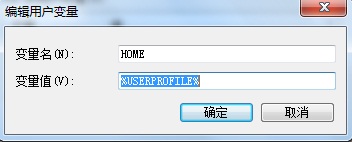
2.1 添加环境变量
在windows中添加一个HOME环境变量,变量名:HOME,变量值:%USERPROFILE%
2.2 创建git用户名和密码存储文件
进入%HOME%目录,新建一个名为"_netrc"的文件,文件中内容格式如下:
machine {git account name}.github.com
login your-usernmae
password your-password
重新打开git bash即可,无需再输入用户名和密码
原文地址:http://www.cnblogs.com/ballwql/p/3462104.html